
TikTok Shop Live Replay Strategy
Learn how to turn TikTok Shop live replays into evergreen sales machines. Discover proven strategies to repurpose past streams, boost GMV, and drive sales 24/7.
You just wrapped a four-hour TikTok Shop live stream. The energy was electric.Your host crushed it — flash sales popped, viewers spiked, and the GMV ticker climbed into five figures. You close the stream, exhale, and move on to planning tomorrow's session.
- Optimize your live replay titles, thumbnails, and product pins instead of leaving auto-generated defaults — only 12-15% of sellers do this.
- Treat every TikTok Shop live replay as an evergreen shoppable asset, not a one-time event, to capture up to 40% more engagement.
- Amplify your best-performing replays with ad spend to generate passive sales for weeks or months without additional creator costs.
- Leverage replays' built-in social proof — comments, reactions, and purchase notifications — as authenticity signals short-form video can't replicate.
- Re-pin top-converting products in your replays to keep embedded links clickable and shoppable long after the original stream ends.
And that's exactly where most sellers leave tens of thousands of dollars on the table.
Here's what most TikTok Shop sellers get wrong: they treat every live stream as a one-time event. The stream ends, the replay sits there with a generic auto-generated title, no optimized thumbnail, and zero promotional support. It quietly collects digital dust while the algorithm moves on.
Meanwhile, the brands crushing it on TikTok Shop have figured out something powerful — your TikTok Shop live replay is not an archive. It's an evergreen sales asset. With the right titling, thumbnail selection, product re-pinning, and ad amplification strategy, a single replay can generate passive sales for weeks or even months after the original stream ends.
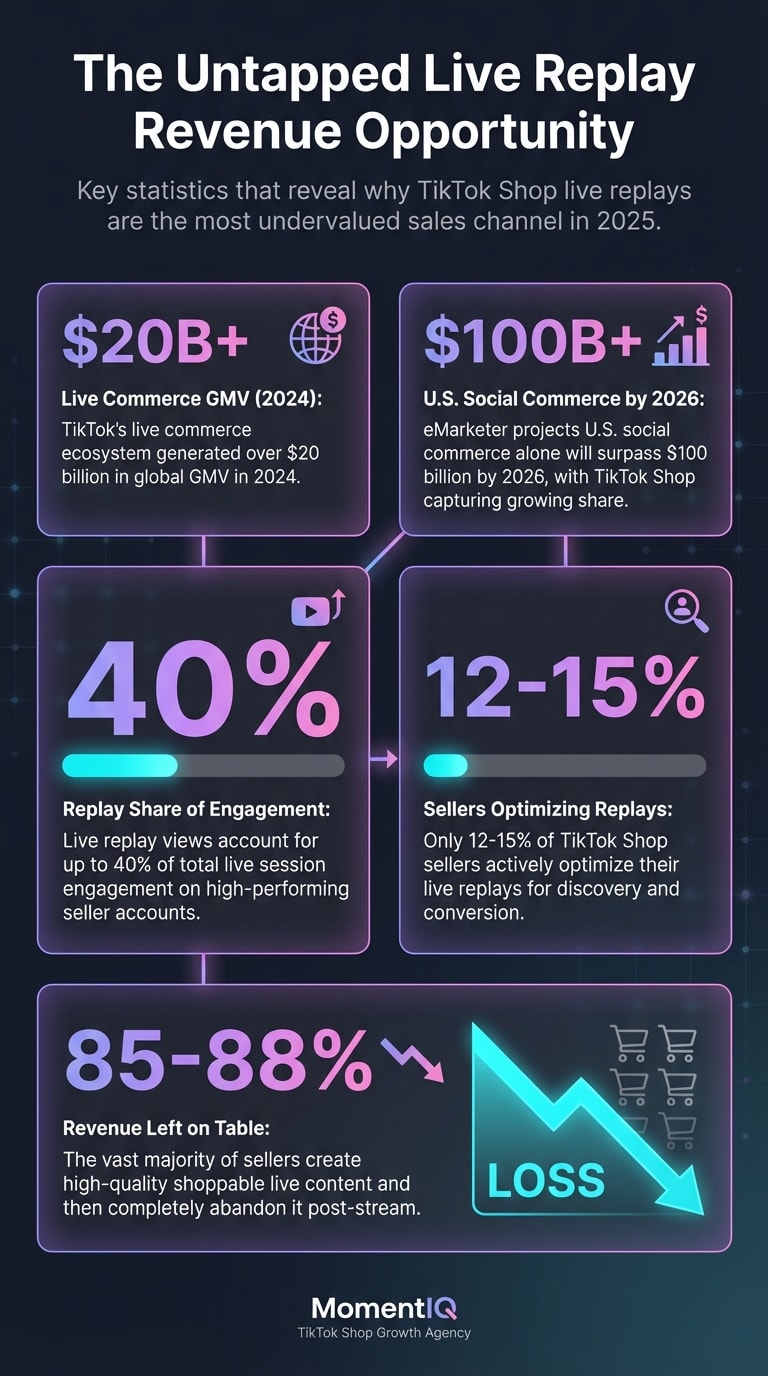
According to TikTok's own Commerce Insights report from late 2024, live replay views account for up to 40% of total live session engagement on high-performing seller accounts. That's not a rounding error — that's nearly half of your potential revenue sitting in a format most sellers completely ignore.
This guide breaks down the exact replay optimization framework that separates six-figure TikTok Shop sellers from everyone else. If you're tired of inconsistent GMV, rising customer acquisition costs, and the exhausting hamster wheel of live-only revenue, this is the playbook you've been missing.
Ready to stop leaving replay revenue on the table? Talk to a Strategist and discover how much untapped GMV is hiding in your past streams.
Why TikTok Shop Live Replays Are the Most Undervalued Sales Channel in 2025
Let's put some numbers behind the opportunity.
TikTok's live commerce ecosystem generated over $20 billion in global GMV in 2024, according to estimates from Statista and FastMoss analytics. eMarketer projects that U.S. social commerce alone will surpass $100 billion by 2026, with TikTok Shop capturing a rapidly growing share.
But here's the data point that should stop every seller in their tracks: only 12-15% of TikTok Shop sellers actively optimize their live replays for discovery and conversion, based on aggregated marketplace data from TikTok's seller analytics ecosystem.
That means the vast majority of sellers are essentially creating high-quality shoppable video content during their lives — and then abandoning it.
Think about what a live replay actually is:
- A multi-product demo with real-time social proof (comments, reactions, purchase notifications)
- An authenticity signal that short-form video can't replicate — viewers see unscripted reactions, honest reviews, and real-time Q&A live selling techniques top sellers use
- A shoppable video with embedded product links that remain clickable after the stream ends
- An algorithm-eligible piece of content TikTok Shop SEO and search ranking that TikTok can surface in For You feeds, search results, and Shop tab recommendations hashtag strategy for organic discovery
When you optimize a replay correctly, you're essentially converting a perishable event into a piece of evergreen content that sells for you 24/7 — without additional creator costs, production budgets, or live hosting hours.
The Compounding Cost of Ignoring Replays
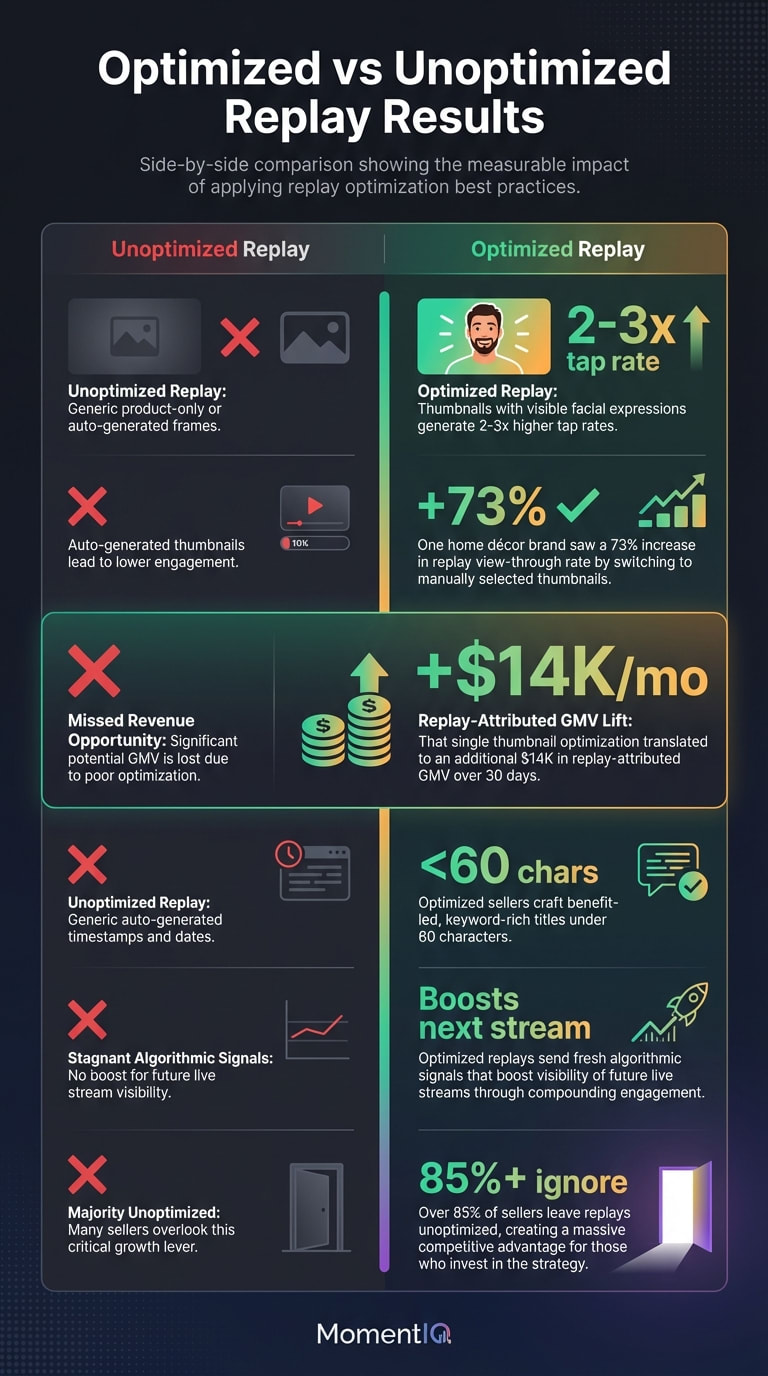
Every unoptimized replay is a missed compounding opportunity. Here's why: TikTok's algorithm evaluates replay engagement (watch time, product clicks, add-to-cart events) as fresh signals. A replay that gains traction can actually boost the visibility of your next live stream by signaling to the algorithm that your content retains commercial value over time.

Brands building their replay library now are creating an algorithmic advantage that latecomers simply can't replicate. While your competitors run the same exhausting cycle of live-only revenue, you can build a passive sales engine that compounds month over month.
The TikTok Shop Live Replay Optimization Framework: 6 Pillars
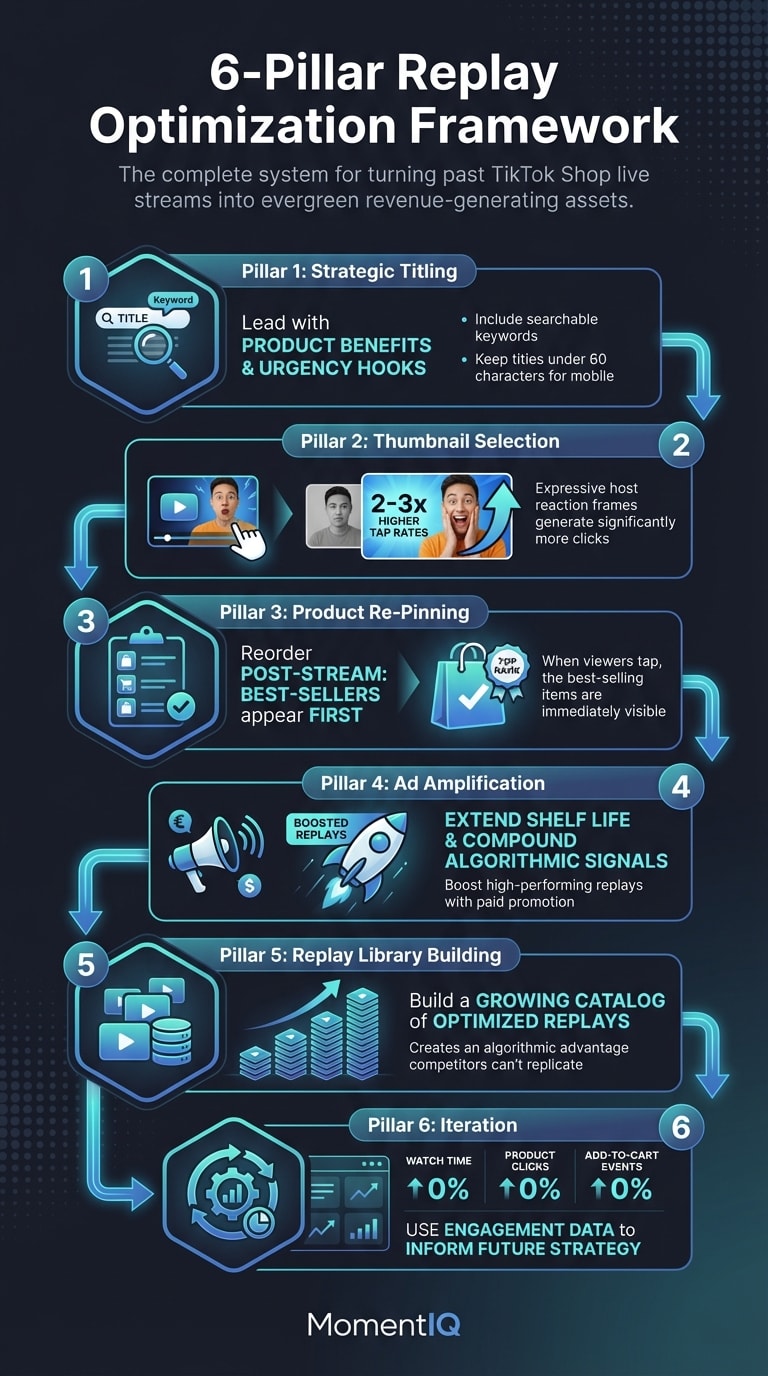
Let's break down the complete system for turning past streams into revenue-generating machines. This isn't theory — it's the framework that MomentIQ uses with brands generating six and seven figures monthly through TikTok Shop live commerce.
Pillar 1: Strategic Replay Titling That Drives Discovery and Clicks
The default replay title TikTok assigns is usually some variation of your original stream title — or worse, a timestamp. This is a conversion killer.
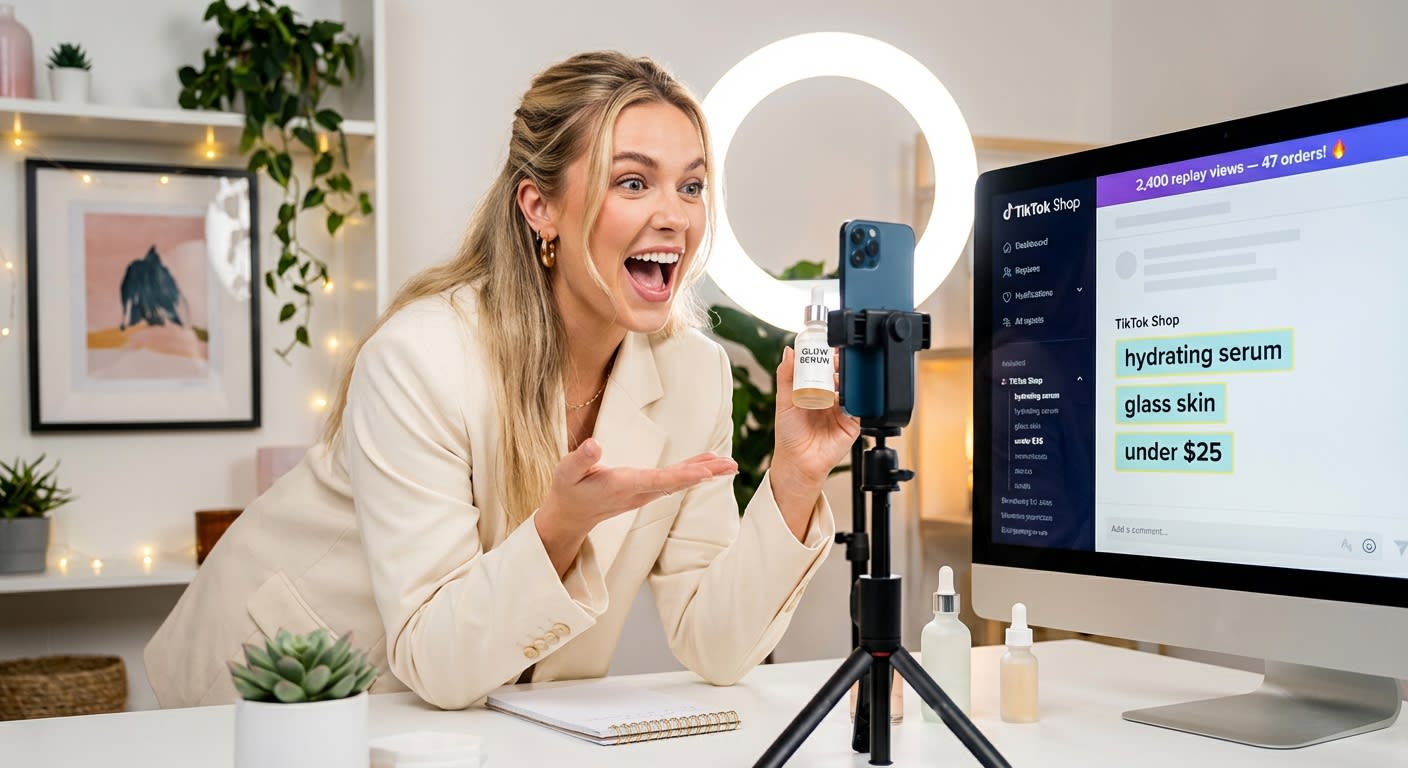
Your replay title is the single most important text-based signal TikTok uses to determine who sees your replay in search, recommendations, and the Shop tab. It's also the first thing a potential viewer reads before deciding whether to tap.
Here's how to optimize:
- Lead with the product benefit, not the event. Instead of "Friday Night Flash Sale Replay," try "Watch Me Test This Viral SPF That Sold Out in 20 Minutes — Full Demo & Honest Review."
- Include searchable keywords naturally. Think about what your target buyer would search: "best affordable skincare routine," "home gym equipment under $100," "TikTok made me buy it haul."
- Add urgency or curiosity hooks. Phrases like "sold out twice," "you asked for this," and "the product everyone's DMing me about" drive click-through.
- Keep it under 60 characters for mobile display. Most viewers see replays on mobile — long titles get truncated.
Pro tip: Update your replay title 24-48 hours after the stream ends, once you can see which products and moments drove the most engagement. Let the data inform your title, not your assumptions.
Title Formulas That Convert
| Formula | Example |
|---|---|
| [Curiosity Hook] + [Product Category] + [Social Proof] | "The $12 Serum That Outsold Everything — Full Live Demo" |
| [Question] + [Benefit] + [Urgency] | "Is This the Best Budget Blender? Watch Before It Sells Out Again" |
| [Trend Reference] + [Product Demo] | "Testing Every Viral Kitchen Gadget From My Last Stream" |
Pillar 2: Thumbnail Selection That Stops the Scroll
TikTok auto-generates a thumbnail from your live stream — and it's almost always terrible. A blurry mid-sentence frame, an awkward angle, or a moment where the host is looking off-camera.
Your thumbnail is your replay's billboard. On the Shop tab and in search results, it competes directly with polished short-form videos and other replays. A bad thumbnail means zero clicks, regardless of how incredible the content inside is.
Here's the optimization playbook:
- Choose a frame showing the product in use. Viewers need to instantly understand what they'll learn or see.
- Prioritize frames with expressive host reactions. Surprise, excitement, or a "wow" moment dramatically increases click-through rates. TikTok's internal creator education materials suggest that thumbnails with visible facial expressions generate 2-3x higher tap rates than product-only frames.
- Overlay text when possible. If TikTok's editing tools allow, add a short text overlay like "SOLD OUT LIVE" or "FULL DEMO" to create context.
- Test different thumbnails on your highest-performing replays. Swap thumbnails after 48 hours if initial engagement is low — the algorithm re-evaluates content when metadata changes.
One home décor brand working with MomentIQ saw a 73% increase in replay view-through rate simply by switching from auto-generated thumbnails to manually selected frames showing the host's reaction to a product reveal. That single change translated to an additional $14K in replay-attributed GMV over 30 days.
Pillar 3: Product Re-Pinning and Replay Shoppability Optimization
This is the pillar most sellers don't even know exists — and it's arguably the highest-leverage optimization in the entire replay strategy.
During a live stream, you pin and unpin products as you demo them. But after the stream ends, the product pinning order in your replay determines what viewers see when they tap the shopping bag icon. If your best-selling product was pinned for only three minutes during a four-hour stream, it might be buried in the replay's product list.
Here's what to do:
- Review your stream's sales data immediately after ending. Identify the top 3-5 products by conversion rate (not just GMV — you want the products that convert browsers to buyers).
- Re-order your pinned products so the highest-converting items appear first in the replay's product carousel.
- Remove underperforming products from the replay's shoppable list. If a product had zero sales during the live, it's dead weight in the replay — it dilutes attention from your winners.
- Ensure product listings are optimized. Your replay drives traffic to your product detail pages. If those pages have weak images, missing reviews, or unclear descriptions, you're leaking conversions at the last mile.
The math is simple: If your replay gets 10,000 views and your average product page conversion rate is 4%, optimizing which products appear first could be the difference between 400 sales and 150 sales. That's not a marginal gain — it's a business-changing delta.
The Re-Pinning Checklist
- ✅ Top 3 products by conversion rate pinned first
- ✅ Out-of-stock items removed or marked as "coming soon"
- ✅ Product images and descriptions refreshed post-stream
- ✅ Bundle or upsell products added if not featured during live
- ✅ Price points verified (no expired flash sale pricing visible)
Pillar 4: Replay Segmentation — Clipping Key Moments for Maximum Impact
A four-hour live stream replay is a commitment. Most casual browsers won't watch the whole thing. But buried inside that four hours are 5-10 golden moments — product reveals, genuine reactions, persuasive demos, and social proof spikes — that could each stand alone as high-converting content.
The smartest TikTok Shop sellers don't just optimize the full replay — they extract and repurpose the best moments.
Here's the workflow:
- Watch your replay analytics. Identify the timestamps where viewer count spiked, where add-to-cart events clustered, and where watch time was highest.
- Clip 60-90 second segments around those moments. These become standalone short-form videos.
- Post clipped segments as regular TikTok videos with product links attached. These clips serve as "trailers" that drive viewers back to the full replay.
- Use clips as ad creative. We'll cover this in detail in Pillar 5, but clipped replay moments are some of the highest-performing ad assets on TikTok — they have the raw authenticity the algorithm rewards.
According to TikTok's Creative Center data, live-clipped content outperforms studio-produced ads by 38% on cost-per-click in the Shop Ads ecosystem. The unpolished, real-time energy reads as authentic to viewers — and authenticity converts.
Important note: This strategy is complementary to your broader creator UGC and short-form video strategy. If you're scaling creator content alongside live commerce, your replay clips become another content pillar that feeds the algorithm without requiring new creator briefs or production cycles. For brands managing 100+ creators alongside live streams, this is where operational complexity explodes — and where having a partner like MomentIQ with proprietary systems for managing content at scale becomes the difference between growth and chaos.
Pillar 5: Promoting Replays via TikTok Shop Ads — The Passive Revenue Multiplier
Here's where the replay strategy shifts from "nice optimization" to "legitimate revenue engine."
Most TikTok Shop sellers think of ads as a tool for promoting products or short-form videos. Very few realize that you can run paid promotion on your live replays — and the results are often dramatically better than traditional ad creative.
Why? Three reasons:
- Social proof is baked in. Viewers see real-time comments, purchase notifications, and genuine reactions — signals that static ads can't replicate.
- Watch time is naturally longer. Replay ads tend to generate higher average watch times, which TikTok's algorithm interprets as a strong quality signal, lowering your CPM over time.
- The content is already proven. You're not guessing which creative will work — you're amplifying content that already demonstrated commercial intent during the live session.
How to Structure Replay Ad Campaigns
Campaign Type 1: Replay Highlight Ads
- Take your clipped 60-90 second replay moments (from Pillar 4)
- Run them as Video Shopping Ads with product links
- Target lookalike audiences based on your live stream viewers and past purchasers
- Expected CPA improvement: 20-35% lower than standard product video ads, based on aggregated TikTok Shop seller benchmarks
Campaign Type 2: Full Replay Promotion
- Boost the full replay to reach users who follow your account but missed the live stream
- This is especially powerful for product launches — viewers get the full demo experience without needing to catch the live
- Set a modest daily budget ($50-$150) and let it run for 7-14 days
Campaign Type 3: Retargeting With Replay Content
- Retarget users who viewed your product pages but didn't purchase
- Serve them the replay segment featuring that specific product
- This closes the consideration gap — they've seen the listing, now they see the product in action with real buyer reactions
One supplement brand implemented this three-tier replay ad strategy and scaled from $18K to $420K/month in 90 days — with replay-attributed revenue accounting for 31% of total GMV. The replay ads ran at a 4.2x ROAS while their standard video ads averaged 2.8x.
Pillar 6: Replay Scheduling and Algorithmic Timing
TikTok's algorithm doesn't treat all content equally at all times. When you publish, edit, or promote your replay impacts how much organic reach it receives.
Here's the timing framework:
- Edit and optimize your replay within 2-4 hours of the stream ending. This is when TikTok's algorithm is still evaluating the content's long-term value. Early engagement signals (from the title change, thumbnail update, and initial organic views) heavily influence how aggressively the algorithm distributes the replay.
- Promote replay clips during peak shopping hours. TikTok Commerce data shows that purchase intent peaks between 7-10 PM local time on weekdays and 12-3 PM on weekends. Schedule your replay clip posts and ad pushes accordingly.
- Refresh replay metadata weekly. Update titles to reflect trending search terms, swap thumbnails, and re-order pinned products based on current inventory and demand. Each metadata update gives the algorithm a reason to re-evaluate and potentially resurface your replay.
The "Set It and Forget It" Myth: Why Replay Strategy Requires Ongoing Optimization
Let's address something directly: replay optimization is not a one-time task. It's an ongoing system that requires monitoring, testing, and iteration.
This is where many sellers hit a wall. You're already managing live streams, creator relationships, product listings, ad campaigns, and inventory. Adding a replay optimization layer on top of all that feels impossible — especially if you're running a lean team.
"We can handle this ourselves" is something we hear constantly. And for a brand doing one or two streams per week, maybe you can. But the moment you scale to daily streams, multiple hosts, or 50+ products, the replay optimization workload compounds exponentially. You're not just optimizing one replay — you're managing a growing library of shoppable content that needs constant attention.
This is exactly why brands partner with MomentIQ. As TikTok's Shop Partner of the Year, MomentIQ doesn't just help brands run better live streams — we build the full post-stream infrastructure that turns every session into a compounding revenue asset. From algorithmic creator matching through our proprietary systems to full-funnel commerce support including replay optimization and ad amplification, MomentIQ handles the operational complexity so you can focus on product and growth.
Want to see how much replay revenue you're currently leaving on the table? Talk to a Strategist and get a custom replay audit of your last 30 days of live streams.
Repurposing TikTok Live Streams: The Content Flywheel Effect
The replay strategy we've outlined doesn't exist in isolation. It feeds — and is fed by — every other content channel in your TikTok Shop ecosystem.
Here's how the flywheel works:
- Live stream generates real-time sales and engagement data
- Replay is optimized with strategic titling, thumbnails, and product pinning
- Key moments are clipped and posted as short-form videos
- Clips are distributed to affiliate creators as reference content (reducing brief complexity and increasing content quality)
- Replay and clips are amplified via ads to cold and warm audiences
- Ad engagement data informs the next live stream's product selection, talking points, and timing
- Cycle repeats with compounding data advantages
This flywheel is what separates brands doing $10K/month from brands doing $500K/month on TikTok Shop. It's not about working harder — it's about building systems that extract maximum value from every piece of content you create.
How This Connects to Your Creator Strategy
If you're running an affiliate program alongside your live commerce operation (and you should be), your replay content becomes a powerful creator recruitment and enablement tool.
- Share top-performing replay clips with prospective creators as examples of what sells and how to present products
- Use replay sales data to set more accurate commission tiers — you know exactly which products convert and at what rate
- Let creators react to or duet your replay clips — this generates additional content without requiring product seeding
Brands managing creator programs at scale through MomentIQ's algorithmic creator matching system see 3-5x higher affiliate acceptance rates when they include replay content in their outreach packages. Creators want to see proof that products sell — and nothing is more convincing than a live replay showing real-time purchases.
Common Replay Strategy Mistakes (and How to Avoid Them)
Before you implement this framework, let's address the most common pitfalls:
Mistake 1: Treating Every Replay Equally
Not every live stream produces a replay worth optimizing. Focus your optimization efforts on your top 20% of streams by GMV and engagement. The Pareto principle applies aggressively here — a small number of your replays will drive the majority of your passive revenue.
Mistake 2: Leaving Expired Promotions in Replays
Nothing kills replay conversion faster than a viewer seeing "50% off for the next 10 minutes!" in a replay they're watching three weeks later. Audit your replays for time-sensitive language and either clip around those sections or add context in the title ("Prices updated — tap products for current deals").
Mistake 3: Ignoring Replay Analytics
TikTok provides replay-specific analytics including view duration, product click-through rates, and add-to-cart events. If you're not reviewing these metrics weekly, you're optimizing blind. Build replay KPIs into your live commerce dashboard alongside your real-time stream metrics.
Mistake 4: Not Budgeting for Replay Ads
Many sellers allocate their entire TikTok ad budget to product video ads and prospecting campaigns. Carve out 15-25% of your monthly ad budget specifically for replay promotion. The ROAS on replay ads consistently outperforms standard creative because the content carries built-in social proof and extended watch time.
Addressing the Elephant in the Room: "Is TikTok Shop Worth the Investment?"
We hear this concern regularly, especially from brands that have been burned by platform shifts or agency relationships that didn't deliver.
Here's the reality: TikTok Shop processed over $33 billion in global GMV in 2024, according to estimates compiled by FastMoss and corroborated by multiple industry analysts. In the U.S. alone, TikTok Shop's GMV grew by over 200% year-over-year. This isn't an experimental channel anymore — it's a primary commerce engine.
As for the "we've tried agencies before" objection — we get it. Most agencies in this space are glorified outreach services that send templated DMs to creators and call it a strategy. MomentIQ is fundamentally different. As a TikTok Marketing Partner and TikTok Shop Partner of the Year, MomentIQ operates with platform-level data access and proprietary algorithmic tools that generic agencies simply don't have. Our Reacher platform (reacherapp.com) automates creator discovery and outreach at a scale that no manual team can match — we're talking thousands of data-matched creator connections per month, not dozens.
And the ROI math speaks for itself. One beauty brand came to MomentIQ spending $8K/month on a combination of in-house creator management and a generalist influencer agency. Within 90 days, they were generating $340K/month in TikTok Shop GMV — with replay-attributed revenue accounting for nearly a quarter of that total. The agency fee paid for itself within the first two weeks.
The cost of waiting isn't neutral. Every month you delay optimizing your TikTok Shop presence — including your replay strategy — your competitors are building algorithmic advantages, creator relationships, and content libraries that become increasingly difficult to compete against. The window for early-mover advantage on TikTok Shop replay optimization is open right now. It won't stay open forever.
Your TikTok Shop Live Replay Action Plan: Next 7 Days
Here's how to start implementing this framework immediately:
Day 1-2: Audit Your Replay Library
- Review your last 30 days of live streams
- Identify top 5 replays by GMV and engagement
- Note which replays have default titles and auto-generated thumbnails
Day 3-4: Optimize Your Top Replays
- Rewrite titles using the formulas above
- Select high-impact thumbnails manually
- Re-order pinned products based on conversion data
- Remove out-of-stock or underperforming products
Day 5-6: Clip and Distribute
- Extract 3-5 key moments from your top replay
- Post as standalone short-form videos with product links
- Share clips with your top affiliate creators as reference content
Day 7: Launch Replay Ads
- Set up a Replay Highlight Ad campaign with your best clip
- Allocate $50-$100/day for initial testing
- Create a retargeting audience from product page visitors
- Monitor for 72 hours before scaling
Stop Treating Live Streams as One-Night Stands
The brands that will dominate TikTok Shop in 2025 and beyond aren't just the ones with the best hosts, the flashiest products, or the biggest ad budgets. They're the ones that extract maximum lifetime value from every single piece of content they create.
Your TikTok Shop live replay strategy is the highest-leverage, lowest-effort optimization most sellers are completely ignoring. With strategic titling, intentional thumbnail selection, smart product re-pinning, moment clipping, and ad amplification, you can turn every past stream into a passive sales machine that compounds over time.
But building and maintaining this system at scale — while simultaneously managing live streams, creator programs, ad campaigns, and product operations — requires infrastructure, data, and expertise that most in-house teams simply don't have.
That's where MomentIQ comes in.
As TikTok's Shop Partner of the Year and a FastMoss Visionary Award winner, MomentIQ helps brands build the complete TikTok Shop revenue engine — from algorithmic creator matching and product seeding at scale to live commerce strategy and post-stream replay optimization. We don't just help you go live. We help you build the systems that make every stream pay dividends for months.
Talk to a Strategist and find out exactly how much revenue is hiding in your replay library. Your past streams are sitting there, waiting to sell. Let's put them to work.